Capturing webcam images without date and time stamp
-
I use WebCam Monitor with my Logitech cameras and I have to compliment you for a well made software. I just have one question - is it possible to capture photos from my webcam without the date and time stamp?
-
WebCam Monitor places a date-time label on photos to show the exact time when the image was captured. You can remove the date and time label if you don’t need it.
Right click on the camera preview and select the ‘Edit Camera’ option. On the labels tab, uncheck the ‘Date and Time Stamp’ option and click the OK button.
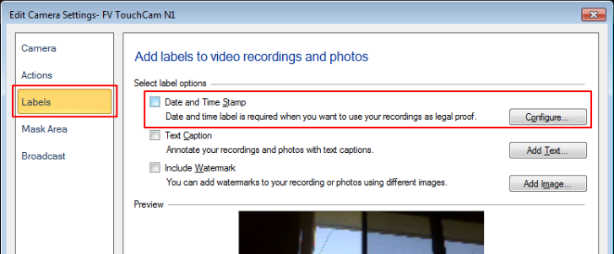
From the Quick Access select the ‘Take Photos’ action and click on the ‘Start Monitoring’ button. You can run the take photo action on motion detection or at regular intervals. The new photos captured will not contain the date-time label.
Hello! It looks like you're interested in this conversation, but you're not signed in.
Sign in with your Deskshare account to ask a question, reply, and get an email when someone answers. You will come back to exactly where you left off.
With your input, this post could be even better 💗
Register Login