Automatically transfer files when I update a folder
-
I want Auto FTP Manager to automatically transfer files from a folder on my PC when I update files within that folder. How do I configure it?
-
The scheduler in Auto FTP Manager allows you to automatically transfer files from a folder when any file within the specified folder gets updated, modified or deleted.
To configure the schedule for an automated transfer profile, right click on the profile name and select Edit Profile option. Move to the action rules page, look for the Schedule Transfers section and click on Configure button. Select On folder change option and browse the folder you want to keep watch on. Make sure you have selected the same PC folder location which you have selected while creating the automated transfer profile.
You can also set the waiting period after the change is made using the Wait ‘N’ minutes before starting transfer option.
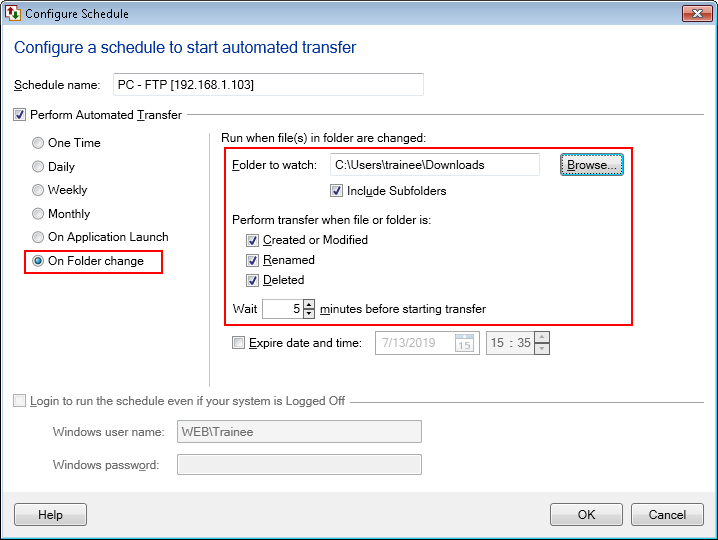
If any modification is done on the selected folder, then On folder change schedule will be invoked and files will be transferred automatically.
Hello! It looks like you're interested in this conversation, but you're not signed in.
Sign in with your Deskshare account to ask a question, reply, and get an email when someone answers. You will come back to exactly where you left off.
With your input, this post could be even better 💗
Register Login