Placing a colorful link on the camera preview
-
I want to use Security Monitor Pro to broadcast my IP camera feed and I want to put my website address on the live video. I want the link address to be in color. Can I do this with your surveillance software?
-
Security Monitor Pro allows you to add text, image and date-time labels on your camera preview and broadcast the stream.
To add your website address on the preview, select 'Manage camera' from the tool bar, then choose the camera and click Edit camera. On Labels tab, select Text Caption and click Add text button. Now, use formatting tool bar to change font and background color of the text. You can also adjust transparency percentage and the position of your text caption on camera preview.
Start broadcasting by selecting 'Broadcast' icon from the tool bar. The text captions will be visible on the camera stream.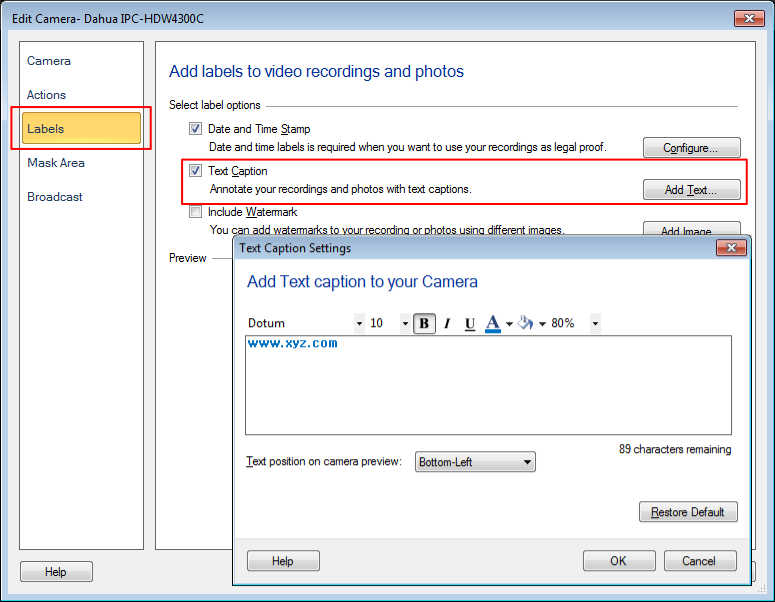
Hello! It looks like you're interested in this conversation, but you're not signed in.
Sign in with your Deskshare account to ask a question, reply, and get an email when someone answers. You will come back to exactly where you left off.
With your input, this post could be even better 💗
Register Login