Running scheduled profiles as a service
-
Hello,
The only problem we experience is that the profiles do not run as a process.
When I'm logged in, all works fine.But when the user logs off, the profiles don't run in the background.
Any idea why the program doesn’t run as a service?
-
Auto FTP Manager can run your schedules as a service.
Make sure the option 'Perform Automated Transfer' is checked so that your automated transfer takes place at the scheduled time.
To have the scheduled transfer occur even if the Windows is logged off or locked at the scheduled time, just enable the option Login to run the schedule even if your system is Logged Off.
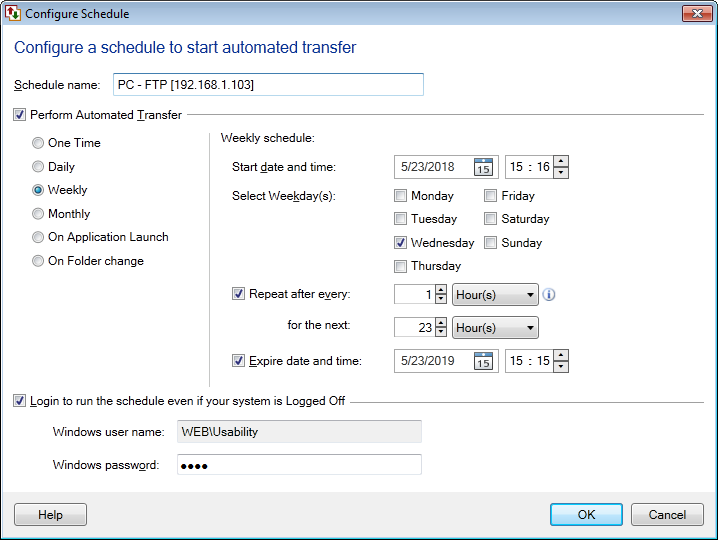
This option allows the profile to run as a background Windows Task at the scheduled time. When you enable this option, you will need to specify the Windows user name and the password. This can be a local Windows account, or if you are part of a Active Directory network, it can be a Domain account. Make sure the username you choose has adequate permission to access the folders you have specified in your FTP profile.
Hello! It looks like you're interested in this conversation, but you're not signed in.
Sign in with your Deskshare account to ask a question, reply, and get an email when someone answers. You will come back to exactly where you left off.
With your input, this post could be even better 💗
Register Login