Adding background music when converting to MP3
-
I am using Text Speaker to read an ebook. I would like to have low volume background music along with the speech. Is this possible?
-
Yes, Text Speaker will allow you to include a background music track in your speech file. Several different formats are supported for background music files.
Follow these steps to add background music:
- Click on "Convert To Audio" from tool bar, you will get this dialog
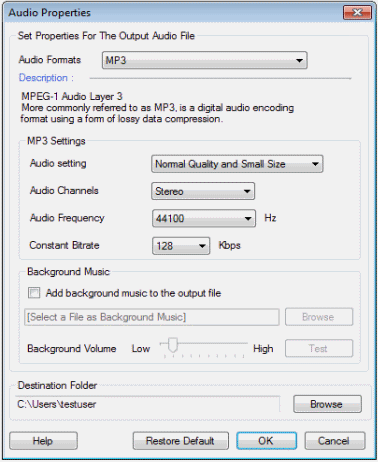
- Enable the option Add background music to the output file.
Click on the 'Browse' button to select your music file and click 'Test' to listen to how it sounds. You can adjust the volume with the help of the slider.
Hello! It looks like you're interested in this conversation, but you're not signed in.
Sign in with your Deskshare account to ask a question, reply, and get an email when someone answers. You will come back to exactly where you left off.
With your input, this post could be even better 💗
Register Login