Record mobile device screen along with webcam video
-
I would like to create a presentation of a mobile app and I want to add myself in the demo. Can I add a webcam in the presentation?
-
You can create a presentation of a mobile device app and use your PC webcam to add yourself in the presentation using My Screen Recorder Pro on your PC and Screen Cast on your mobile device.
First, install My Screen Recorder Pro on your PC.
Next, open Screen Cast, select the connection type and copy the ID and password to use in My Screen Recorder Pro. The password is optional which can be changed from the application settings.
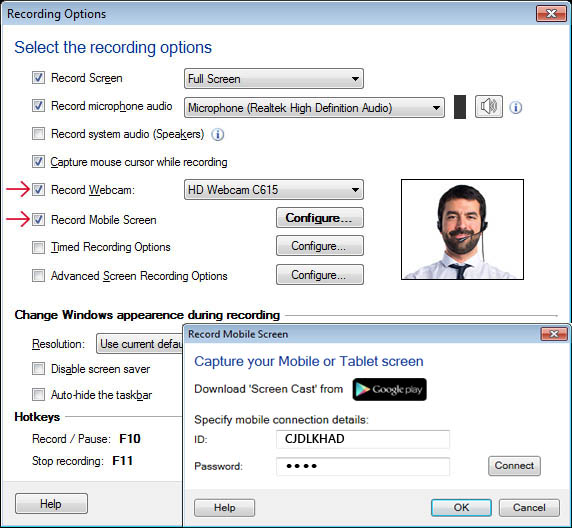
Then open My Screen Recorder Pro and click the Record icon on the toolbar. On the **Recording Options **dialog, select Record Webcam and select the webcam from dropdown list. You will see the camera preview in the window. Now select the Record mobile screen checkbox and configure the settings by providing the ID and password from the Screen Cast app. Click OK to save your settings and start recording.
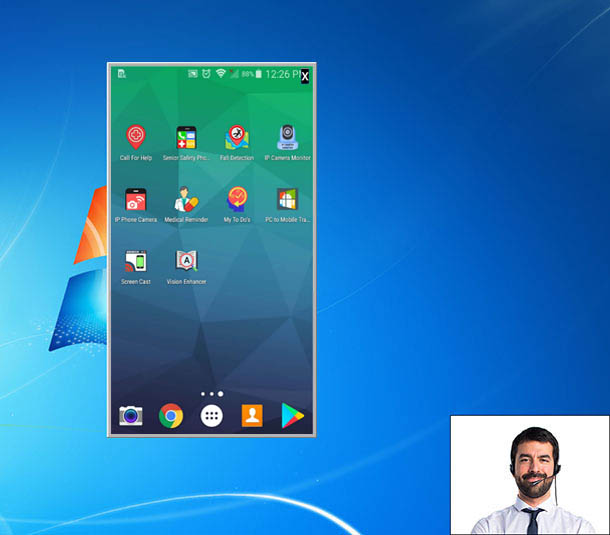
You will see both the mobile screen and webcam preview on your PC screen.
Hello! It looks like you're interested in this conversation, but you're not signed in.
Sign in with your Deskshare account to ask a question, reply, and get an email when someone answers. You will come back to exactly where you left off.
With your input, this post could be even better 💗
Register Login