Prevent mobile device from sleep mode while streaming
-
I am using Screen Cast to broadcast my mobile screen on my PC. But my mobile screen turns off after the screen times out. Is there any way to prevent this while streaming?
-
You can continuously broadcast your mobile screen to your PC without any interruption.
Generally, the Mobile screen turns off after a screen timeout. To stop this from happening, select Prevent device from sleep and lock mode from Settings.
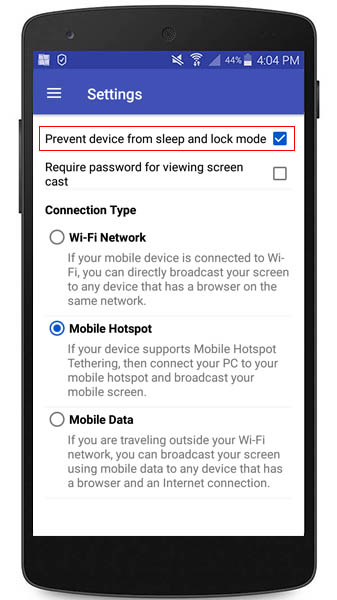
Now when you start streaming, your device will not go into sleep and lock mode.
Hello! It looks like you're interested in this conversation, but you're not signed in.
Sign in with your Deskshare account to ask a question, reply, and get an email when someone answers. You will come back to exactly where you left off.
With your input, this post could be even better 💗
Register Login