View the camera on another device with Mobile Hotspot
-
I don’t have Wi-Fi network at my home. I want to stream my mobile camera preview to another mobile device. How can I do this with IP Phone Camera?
-
Using IP Phone Camera, you can easily connect to any device that has a browser such as a PC, a mobile or a smart TV using mobile hotspot.
To establish a connection using mobile hotspot, open the IP Phone camera app and go to Settings. Choose Connection Type as Mobile Hotspot and click on 'Yes, go to Settings'. From your device's settings, turn on the hotspot. Press 'Start Broadcasting' to see the URL on the homepage of the app. Note down the URL required for connection with another device.
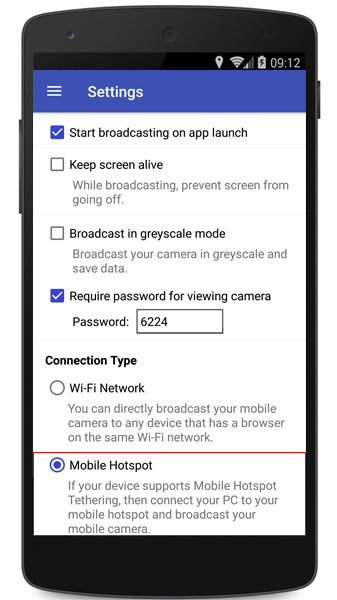
On the other device, go to the device's Wi-Fi settings. Turn ON the Wi-Fi. You will see the hotspot name in the list. Select the network and click on the Connect button to establish a connection between both the devices.
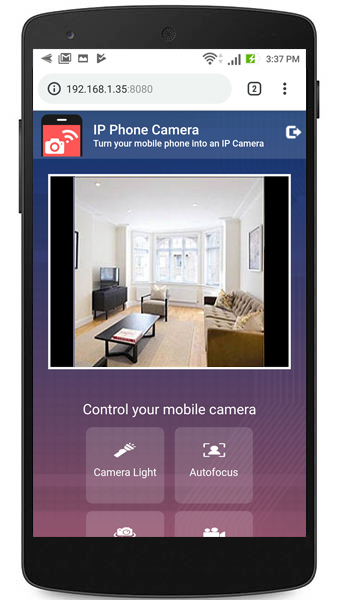
Once you have configured these settings, open the browser on the mobile device and enter the URL for connection. You will see the camera preview from one mobile device displayed on the other mobile device.
Hello! It looks like you're interested in this conversation, but you're not signed in.
Sign in with your Deskshare account to ask a question, reply, and get an email when someone answers. You will come back to exactly where you left off.
With your input, this post could be even better 💗
Register Login