Using a separate microphone to record audio with WebCam Monitor
-
I want to use WebCam Monitor to record the video from my old USB camera, but it does not have a microphone. I have a separate microphone. Can you tell me how to use it to capture the audio while recording the video from the camera?
-
You can use a secondary microphone to capture audio in WebCam Monitor.
Connect the microphone and USB camera to your computer and launch WebCam Monitor. Click on the Add Webcam option on the toolbar. The attached webcam will appear in the Camera Model dropdown list. You will also see the camera preview.
Your microphone will be listed in the audio device drop-down list. Select it and click on the play button to hear the audio from the microphone. If everything is fine then click OK to save the settings.
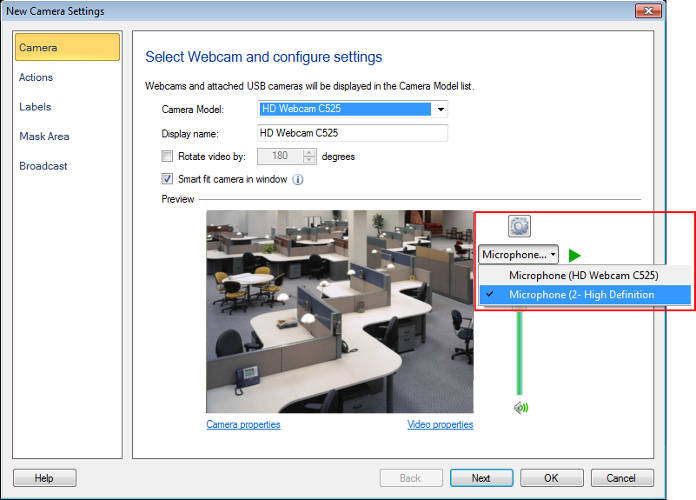
Once you have configured the settings, right click on the camera preview and start the recording. When you will play the recorded video you will see that the audio from microphone has been recorded.
Hello! It looks like you're interested in this conversation, but you're not signed in.
Sign in with your Deskshare account to ask a question, reply, and get an email when someone answers. You will come back to exactly where you left off.
With your input, this post could be even better 💗
Register Login