Turn off recording webcam videos and photos at night
-
I have added my USB camera in WebCam Monitor and set it to monitor motion in my office. I don’t want to record the actions during the night since the office is empty. Can I stop the monitor action for night time and start it again automatically the next day?
-
You can add a schedule to perform the monitoring in WebCam Monitor. If you set the morning start time, you can then run the schedule for the daytime hours until the office is closed.
To create a schedule, click on the Scheduler icon on the tool bar. Select your webcam, and set the schedule type as Daily. By default, the monitoring actions option is selected. Enter the start date, and make the time 6:30. In the Run For field, enter the value of 16 hours, so that the schedule will run till 22:30. Save the scheduler settings.
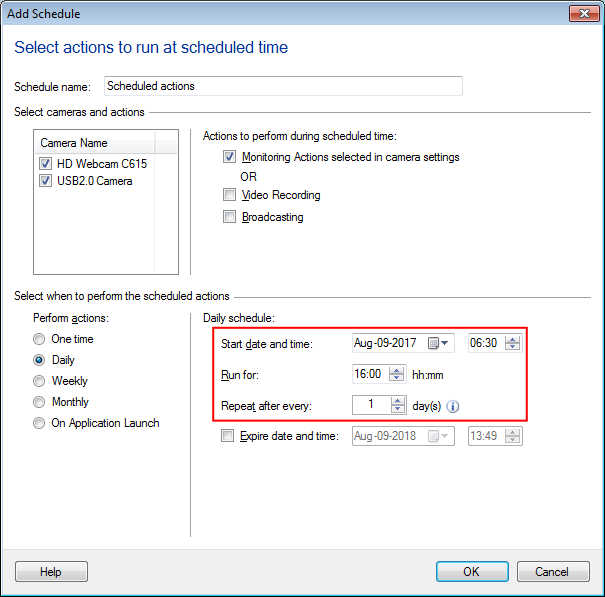
The schedule will automatically start every day at 6:30 AM in the morning and will begin monitoring. The monitoring will be stopped at 10:30 PM.
Hello! It looks like you're interested in this conversation, but you're not signed in.
Sign in with your Deskshare account to ask a question, reply, and get an email when someone answers. You will come back to exactly where you left off.
With your input, this post could be even better 💗
Register Login