Automatically removing older media recording files from my PC
-
I use WebCam Monitor to record video from two webcams. I always keep it running, so a lot of files are getting created every day. This reduces the disk space on the local drive. Is it possible to remove the older media files from my PC and make space for new files?
-
WebCam Monitor will automatically delete the oldest files from your PC if the space left on the drive is less than 2 GB.
To delete older media files, click the Settings icon on the toolbar. On the General settings tab, look for the **Media file **options section. Set the disk space value in the Auto delete oldest files when space left on drive is less than N GB option. You can also select the Auto delete files older than option and enter the number of days to keep files. When this option is checked files older than specified number of days will be deleted. Click Ok to save these settings.
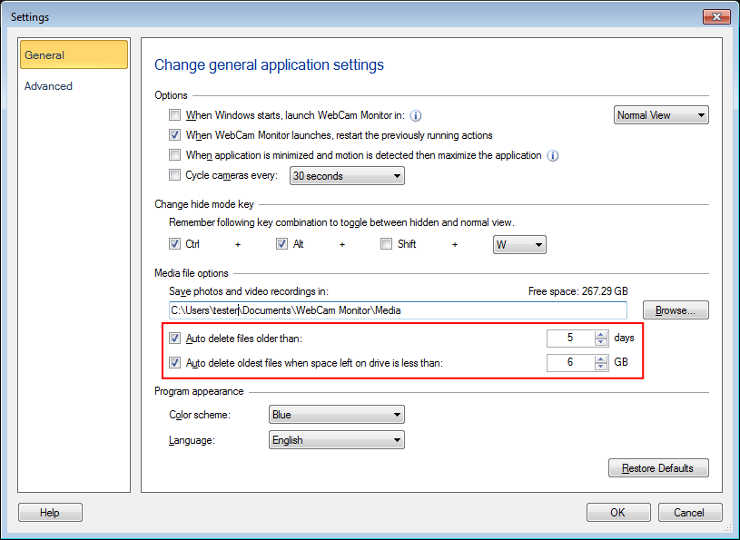
This way WebCam Monitor can automatically manage disk space and new recordings will be added.
Note: Choose “Auto delete files older than N days” option only if you know that all the important files will be reviewed or copied to a new location within a specified number of days.
Hello! It looks like you're interested in this conversation, but you're not signed in.
Sign in with your Deskshare account to ask a question, reply, and get an email when someone answers. You will come back to exactly where you left off.
With your input, this post could be even better 💗
Register Login