Transfer files that match a specified file size
-
I want to transfer only files that are 500MB in size. Can I restrict Auto FTP Manager to transfer based on the size of a file?
-
Auto FTP Manager can select files that match a size. The advanced filters option lets you choose to either transfer only files that match the size or send everything except the size-matched files.
First, create an Automated profile. On the menu bar, click File >> New Connection Profile. Select connection profile type as Automated Profile and enter the FTP details. Navigate to the next page and look for the Actions Rule section. Select the option to download or upload files from source to destination.
Next, go to the File and Folders Filters section and click the Configure button. Select the File Size filter option, set it to Include file size Equal to '500' MB and click the OK button to save the filter settings. On the next page enter the profile name and click the Create button.
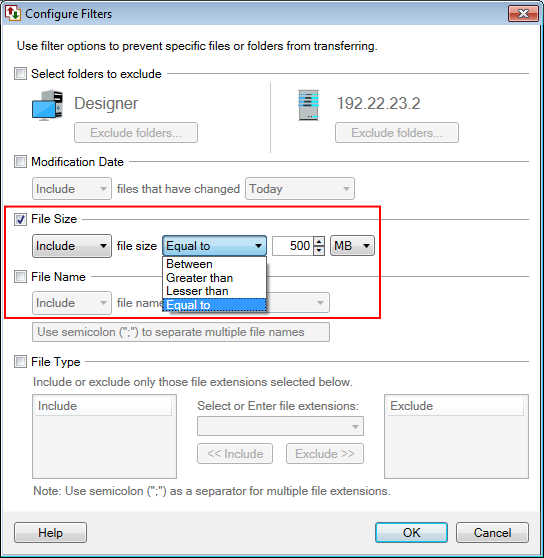
Now, whenever you start the automated transfer, the files matching the specified file size will be transferred.
Note- Auto FTP Manager provides five type of filters you can set for files during automated transfer such as **Select folders to exclude, Modification Date, File Size, File Name and File Type.
**
Hello! It looks like you're interested in this conversation, but you're not signed in.
Sign in with your Deskshare account to ask a question, reply, and get an email when someone answers. You will come back to exactly where you left off.
With your input, this post could be even better 💗
Register Login