Downloading recent files from FTP server
-
I want to download only the latest files from FTP server automatically. Can I do this using Auto FTP Manager?
-
Auto FTP Manager allows you to download the latest files automatically using the Modification Date filter.
To download files from the FTP server automatically, you have to create an automated transfer profile from File >> New Connection Profile. Select action rule for downloading the files.
To add filters for your automated transfer profile, go to the Files and Folder filters section and click Configure button. Select the Modification Date filter type. Set this option to Include files that have changed ‘Today’ or ‘In the Last’ few hours/ minutes.
For example- Transfer files that have changed in the last 10 minutes.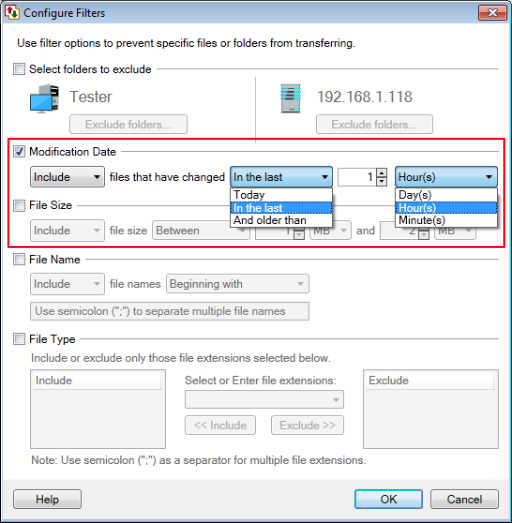
To automate the transfer process, configure a schedule for this profile. Look for Schedule Transfers section and select the schedule type as Daily. Set a schedule to repeat after every N days / hours / minutes. Click Ok to save these settings. Navigate to the next page and finish the settings.
The recent files will be automatically downloaded from the FTP server whenever schedule gets invoked.
Hello! It looks like you're interested in this conversation, but you're not signed in.
Sign in with your Deskshare account to ask a question, reply, and get an email when someone answers. You will come back to exactly where you left off.
With your input, this post could be even better 💗
Register Login