Converting multiple text files to mp3 audio
-
Can I use Text Speaker to convert multiple text files to audio files at once?
-
A batch conversion of text to audio is supported in Text Speaker.
Click on the ‘Open’ icon on the tool bar. Select all your text files and click on the open button. The files will be listed in the ‘File List’.
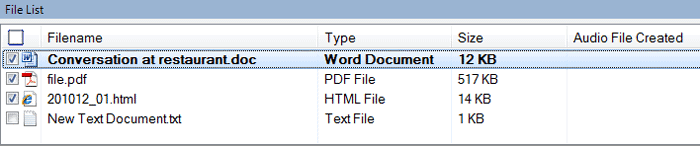
Choose the files which you would like to convert to audio from the file list. Go to the ‘Speak’ menu and select the ‘Convert Selected Files to Audio’ option.
Hello! It looks like you're interested in this conversation, but you're not signed in.
Sign in with your Deskshare account to ask a question, reply, and get an email when someone answers. You will come back to exactly where you left off.
With your input, this post could be even better 💗
Register Login