Keeping a copy of all photos uploaded from WebCam Monitor
-
I want to capture photos from my webcam and put it on a FTP server. While uploading I would like to keep all my images, I don't want them overwritten with a new photo. Can I do this using WebCam Monitor? What is the setting for that?
-
Using WebCam Monitor you can upload videos and photos taken from your webcam to a FTP server.
To upload photos to a FTP server, add your webcam in WebCam Monitor. Select ‘Take Photo’ and ‘Upload Media Files’ options on the Actions tab. To upload files to a FTP server, you need to create FTP account profile and enter details like FTP address, username, password and port.
After creating the FTP profile you will see a ‘FTP Upload Settings’ dialog. Choose ‘Upload photos to my website’option from the drop down under ‘Upload Options’ section.
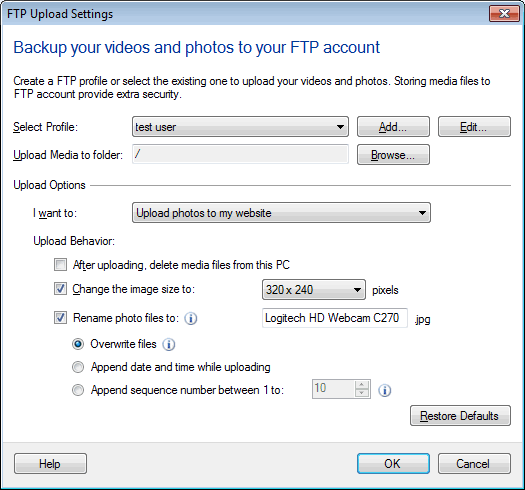
Finally, choose ‘Append date and time while uploading’ option. This will maintain all your images at the FTP location and will add the date-time to the file name.
Hello! It looks like you're interested in this conversation, but you're not signed in.
Sign in with your Deskshare account to ask a question, reply, and get an email when someone answers. You will come back to exactly where you left off.
With your input, this post could be even better 💗
Register Login