Generating a unique voice using Text Speaker
-
I am using Text Speaker with one of the AT&T voices and it is working well. I have only a single AT&T voice. Can I make some adjustment for the AT&T voice and have a unique voice which will be different from the original voice?
-
You can adjust the voice pitch, speed and volume in Text Speaker.
Do these adjustments from ‘Voice Options’ dialog.
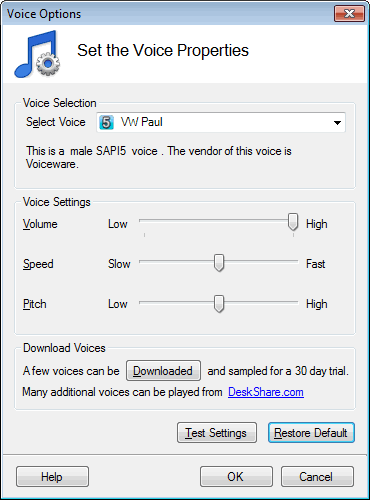
Before applying the changes click on the ‘Test Settings’ button to listen to the voice. By using ‘Restore Defaults’ button you can revert the changes you made.
Hello! It looks like you're interested in this conversation, but you're not signed in.
Sign in with your Deskshare account to ask a question, reply, and get an email when someone answers. You will come back to exactly where you left off.
With your input, this post could be even better 💗
Register Login