Using different date formats on each webcam
-
I am using two webcams in WebCam Monitor and it is working well for me. I want to place different date formats on each webcam. Is this available in WebCam Monitor?
-
Yes, you can set different date formats on each webcam in WebCam Monitor.
Go to the Edit camera dialog and select the ‘Labels’ tab. Click on ‘Configure’ button, you will see the following window:
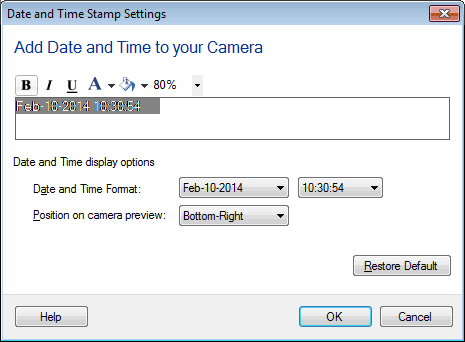
Choose a different date format from the drop down. Repeat the same procedure for other webcam.
Hello! It looks like you're interested in this conversation, but you're not signed in.
Sign in with your Deskshare account to ask a question, reply, and get an email when someone answers. You will come back to exactly where you left off.
With your input, this post could be even better 💗
Register Login