Using bookmarks while reading an ebook
-
I am using Text Speaker to read a long e-book. I am not able to listen to the whole book at once, and sometimes I only get through part of a chapter. So I have to manually find the point where I left off. Is there any way that I can find it more easily?
-
When reading a long text, you can easily return to the point where you left off by using Text Speaker's bookmarks feature.
To add a bookmark click the position in the document where you left off, and click Edit >> Add Bookmark. Give the bookmark a name.
You can add multiple bookmarks to your document and quickly return to the position at any time. To return to a bookmark, click Edit >> Go to Bookmark and choose a bookmark from the dropdown.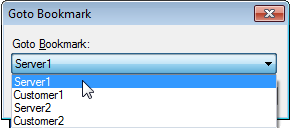
Hello! It looks like you're interested in this conversation, but you're not signed in.
Sign in with your Deskshare account to ask a question, reply, and get an email when someone answers. You will come back to exactly where you left off.
With your input, this post could be even better 💗
Register Login