Changing the Playback speed of recordings
-
While reviewing recordings, I would like to watch the recorded videos at a faster speed. How can I speed up the playback?
-
You can increase the playback speed in Security Monitor Pro.
Follow these steps:
- Click on the 'Media Analyzer' icon on the tool bar

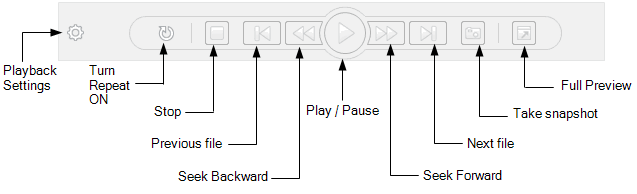
- You will see all your video recordings in media analyzer. Now click on 'Playback Settings' icon on preview control.
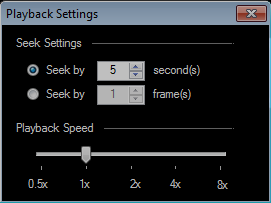
- Change the playback speed using the slider control.
- Finally, click on the Play button and your file will be played at the speed you have set.
You can slow down or increase the playback speed as you wish.
Hello! It looks like you're interested in this conversation, but you're not signed in.
Sign in with your Deskshare account to ask a question, reply, and get an email when someone answers. You will come back to exactly where you left off.
With your input, this post could be even better 💗
Register Login