Upload a file only once during a automated transfer
-
Hi,
New files should be uploaded only once.
If the files are deleted on the FTP server, the files should not be re-uploaded. The main problem is that the file will be filterd and moved to a specific directory on the ftp Server. Therefore the file seems to be deleted from the upload directory. The result is that the file will be uploaded again and again.is it possible to upload only once?
-
Yes, Auto FTP Manager provides filter options so you can achieve the transfer results you are looking for.
Edit your automated profile and select the Transfer Rules tab. Click on the Filter Options button and check the Modification Date box. Set to Include files that were modified Today. Here is an illustration:
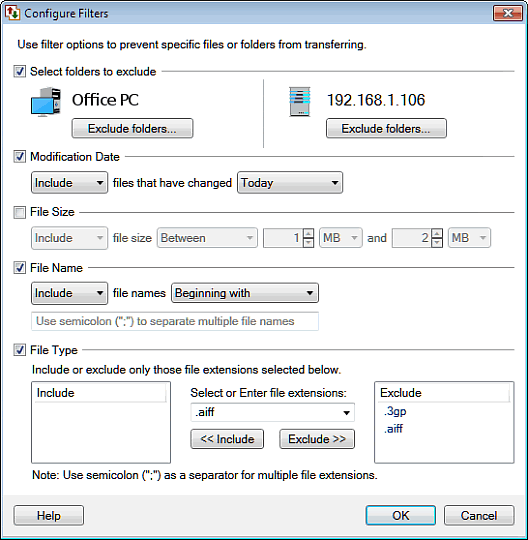
Execute your schedule at the end of the business day and the files will be transferred only once.
Hello! It looks like you're interested in this conversation, but you're not signed in.
Sign in with your Deskshare account to ask a question, reply, and get an email when someone answers. You will come back to exactly where you left off.
With your input, this post could be even better 💗
Register Login