Text Speaker has a few settings that will control the size of the audio file when you convert text to audio in MP3 or WAV format.
To convert text to audio format, click on the
Convert to Audio option on the toolbar. On the
Audio Properties dialog, look for the MP3 settings section. You can select the option from the Audio setting dropdown according to quality and size requirement. If you select a higher quality, the file size will be larger.
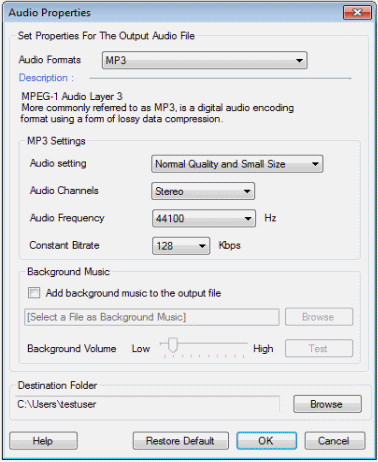
You can adjust the audio frequency for the file to be generated. A higher frequency produces better quality but larger audio files. You can also adjust the constant bitrate. High bitrate value results in larger files.
You can use the above settings to get the exact balance of audio quality and size you require. The default settings in Text Speaker will create audio files that sound good and are still compact.



 Sign In