Products
Support
Resources
Company


 Sign In
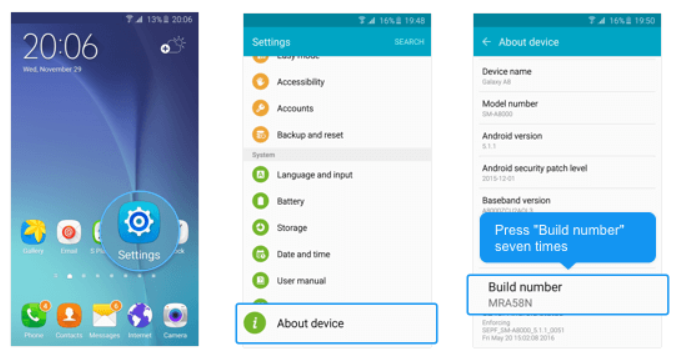 4. Return to the previous screen to find Developer options, turn it ON
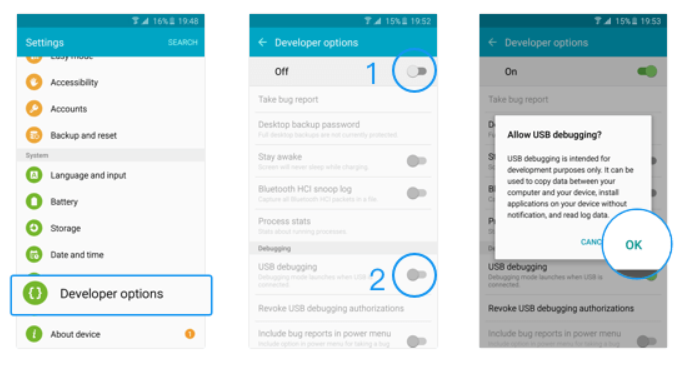
5. Scroll down and enable USB debugging.
4. Return to the previous screen to find Developer options, turn it ON
5. Scroll down and enable USB debugging.
 If USB debugging is already enabled and device is not connecting and not listed then:
1. Open the Settings app
2. Search for 'USB Preferences' option
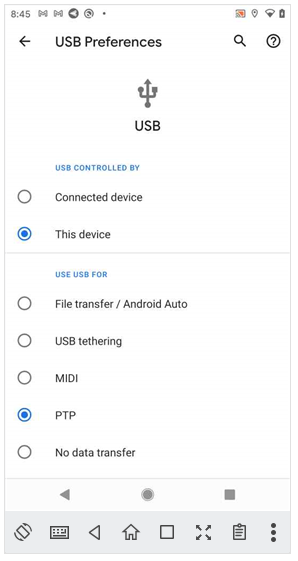
3. Set 'USE USB FOR' to 'PTP' as shown in this screenshot:
If USB debugging is already enabled and device is not connecting and not listed then:
1. Open the Settings app
2. Search for 'USB Preferences' option
3. Set 'USE USB FOR' to 'PTP' as shown in this screenshot: